
Reviews
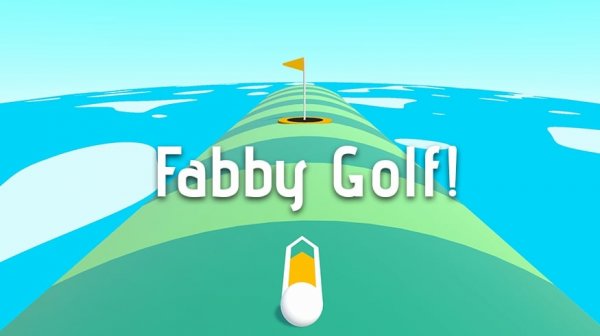
Fabby Golf keeps the sport's core appeal intact: read the hole, pick a line, and sink the ball in as few strokes as possible. The drag-and-release control scheme is immediately understandable, and the 3D presentation gives shots a useful sense of depth. Its family-friendly tone and cross-platform availability on browsers and Android make it easy to pick up for short sessions. The main limitation is that the available information does not detail difficulty progression or course variety beyond multiple levels, so players seeking deep simulation features should temper expectations.
About this game
Core Shot Mechanics
Fabby Golf uses a drag-and-release control scheme. On a browser or Android device, you drag the mouse or touch to adjust both the direction and the power of your shot. Releasing sends the ball rolling. There is no separate power meter to watch; the drag distance itself communicates how hard the ball will travel. That single input covers aiming and strength, which keeps the moment-to-moment play focused on reading the green rather than managing multiple buttons.
Level Structure and Planning
Each level presents a new layout with its own terrain and obstacles. The goal is always the same: sink the ball in as few strokes as possible. Because every hole rearranges the relationship between your starting position, the cup, and whatever lies between them, the game rewards a short planning pause before each shot. Gentle adjustments tend to work better than aggressive swipes, especially when the ball sits near a slope or a barrier. If a level goes badly, pressing the R key restarts it immediately, so experimenting with a different line costs almost nothing.
Presentation and Accessibility
The game runs in 3D with colorful graphics and smooth animations, giving the ball and course a clear sense of depth. That visual clarity matters because judging distance is part of every shot. The interface stays clean and unobtrusive, and the overall tone is family-friendly, with no inappropriate content. Cross-platform support means the same game is playable on web browsers and Android devices, making it easy to fit a few holes into a short break or settle in for a longer session.
Who It Suits
Fabby Golf is built for players who want golf without a steep learning curve. The drag-to-shoot system is easy to understand on the first hole, but the later layouts still ask for accuracy and patience. Golf fans will recognize the stroke-counting rhythm; casual players can treat it as a relaxed pastime. The lack of complex rules or menus means the challenge comes from the shots themselves, not from figuring out how to play.
Editorial Notes
✅ Compatibility & Testing
• Desktop (Windows 11, macOS Ventura)
• Mobile (iPhone 14, Samsung Galaxy S23)
• Tablet (iPad Pro, Android tablet)
✅Supported browsers: Chrome, Safari, Edge, Firefox (latest versions)
❌ Not supported: Internet Explorer, older browser versions
Faq
What devices can run Fabby Golf?
Fabby Golf is playable on web browsers and Android devices. The same drag-based controls work on both, so you can play with a mouse on a computer or with touch input on a phone or tablet. No additional platform-specific version is mentioned in the available information.
How do I restart a level in Fabby Golf?
Press the R key to restart the current level. This is useful when a shot goes wrong or when you want to try a different angle without finishing the hole. On touch devices, the restart option may be available through the game interface, though the keyboard shortcut is the method specifically described.
Is Fabby Golf suitable for children?
Yes. Fabby Golf is described as family-friendly with no inappropriate content. Its colorful 3D graphics, simple drag-and-shoot controls, and cheerful presentation make it accessible to younger players. The challenge comes from aiming and planning shots rather than from any mature themes or complex mechanics.
Who developed Fabby Golf?
Fabby Golf was developed by Seryas Games. The studio is credited with creating the game's 3D arcade-style golf experience, including its colorful graphics, smooth animations, and cross-platform availability on web browsers and Android devices.
What is the goal of each level in Fabby Golf?
The objective is to get the ball into the hole in as few strokes as possible. Each level has a new layout with different terrain and obstacles, so the path to the cup changes every time. Lower stroke counts reflect better aim and more careful planning.
Does Fabby Golf require an internet connection?
The game is playable on web browsers and Android devices. Browser-based play typically requires an internet connection to load the game, while an installed Android version may or may not need one depending on how it is distributed. The available information does not specify offline support.





Comments
0 comments