
Reviews
Creative World Builder 2 delivers exactly what its name suggests: a quiet space to build with blocks. The four distinct worlds give each project a different backdrop, and the ability to dig and reshape terrain adds depth beyond simple stacking. The absence of timers, scores, or rules makes it welcoming for children and anyone seeking a low-pressure creative outlet. Its main limitation is the lack of structured goals, which may not appeal to players who want direction or progression.
About this game
Four Worlds, One Creative Goal
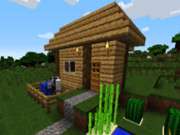
Creative World Builder 2 drops players into one of four distinct landscapes, each with its own terrain and visual style. Grassy plains and rocky deserts are among the available settings, giving builders a fresh backdrop for every project. There is no objective beyond construction itself, so the choice of world becomes the first creative decision. Whether the plan is a small house or a sprawling sculpture, the environment sets the tone for what gets built.Building and Reshaping the Land
Using a mouse or touch controls, players pick up blocks and place them anywhere in the environment. Blocks stack to build upward, can be removed to create openings, and can be rearranged to change the shape of the ground. Digging allows for terrain modification, opening possibilities like ponds, caves, or sunken areas. The controls are designed for immediate experimentation, so even young players can start placing and removing blocks without a tutorial.A Pressure-Free Approach
There are no timers, levels, or scoring systems in Creative World Builder 2. Sessions move at whatever pace the player chooses, and nothing punishes mistakes or slow progress. The family-friendly design keeps the environment safe for children, with no inappropriate content. Colorful graphics and a clean interface keep attention on the building process rather than on menus or distractions. The only rule is to let creativity guide the session.Getting Started with Simple Projects
New players can begin by exploring each world to find the landscape that feels most inspiring. Starting with a small house or a tower helps build familiarity with block placement and stacking before attempting more complex structures. Experimenting with different block combinations reveals new design possibilities. The digging feature adds another layer, letting players reshape the environment itself, such as creating a lake or carving out a cave. Taking time with simple builds first makes larger projects more manageable.Editorial Notes
Compatibility
This H5 game runs smoothly on:
• Desktop computers (Windows / Mac) • Mobile phones (iPhone / Android)
• Tablets (iPad / Android)
🌐 Best experienced with Chrome, Safari, or Edge
Faq
Does Creative World Builder 2 have any goals or objectives to complete?
No. Creative World Builder 2 is an open-ended sandbox with no objectives, scores, or timers. The game is designed around freeform creativity, so players set their own goals, whether that means building a house, sculpting a figure, or reshaping the terrain. There is no win condition or progression system to follow.
What worlds are available in Creative World Builder 2?
The game includes four distinct worlds, each with a different landscape and visual style. Examples mentioned include grassy plains and rocky deserts. Every world provides a unique setting for building projects, and players can choose the one that best fits the kind of structure or scene they want to create.
Is Creative World Builder 2 suitable for young children?
Yes. The game is designed with a family-friendly approach and contains no inappropriate content. Its simple mouse or touch controls make it accessible for kids, and the absence of timers, scores, or failure states removes pressure. Parents looking for a constructive, calm activity for children will find it fits that purpose.
Can players dig or change the terrain in Creative World Builder 2?
Yes. Blocks can be removed to create openings, and the digging feature allows players to reshape the ground itself. This means you can lower terrain to form ponds, carve out cave-like spaces, or rearrange blocks to change the landscape. Terrain editing is part of the core building toolset.
What controls does Creative World Builder 2 use?
The game uses simple mouse or touch controls. Players pick up blocks and place them anywhere in the environment, stack them to build upward, or remove them to create gaps. The interface is kept clean so that building remains the focus, and the controls are intuitive enough for immediate experimentation without a lengthy tutorial.
Is there a time limit or scoring system in Creative World Builder 2?
No. Creative World Builder 2 has no timers, levels, or scoring systems. Players work at their own pace, and there is no penalty for taking time or making changes. The design intentionally removes pressure so that sessions stay relaxed and creativity can guide the process from start to finish.







Comments
0 comments