
Reviews
Creative Block World Builder delivers exactly what its name suggests: a stress-free space to gather, craft, and build. The absence of enemies, timers, and objectives makes it accessible to younger players and anyone wanting a quiet creative outlet. Its simple controls and clear feedback lower the barrier to entry. The main limitation is the lack of structured challenges, which may not appeal to players seeking goals or progression systems. As a relaxed sandbox, it succeeds on its own terms.
About this game
A Sandbox Without Pressure
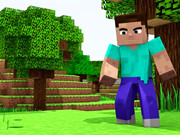
Creative Block World Builder drops players into a large open world made of colorful blocks. There are no set objectives, no time limits, and no way to fail. The game's structure is entirely player-driven: you decide what to build, where to explore, and how to spend your time. This absence of external goals is the core design choice, and it shapes every interaction. The result is a low-stakes environment where experimentation is always safe.
Gathering and Crafting
Progress comes from collecting natural materials scattered across the landscape. Different resources enable different types of constructions, so exploration directly feeds into building options. A simple crafting interface lets you combine raw resources into more complex items, such as tools or decorative blocks. Learning the crafting system early pays off because tools can speed up gathering, which in turn makes larger projects more feasible. The loop is straightforward: gather, craft, build, repeat.
Building Block by Block
Construction is based on placing individual blocks, allowing for detailed and personalized structures. The point-and-click or tap-to-place controls are designed for beginners, with clear visual feedback for every action. Because there are no enemies or hazards, you can focus entirely on layout and design. Planning a build before starting can help you use materials efficiently, especially for large projects. The only limit is your imagination.
Who It's For
This game is aimed at younger audiences and anyone seeking a calm creative outlet. Its simple visual style and intuitive interaction model mean players of all skill levels can start building quickly. The lack of pressure makes it a good fit for short sessions or long, unhurried play. If you enjoy open-ended creativity without combat or deadlines, this sandbox offers a welcoming space to explore and construct.
Editorial Notes
Compatibility
Play on Any Device | Chrome / Safari / Edge Recommended
Faq
Is Creative Block World Builder suitable for young children?
Yes. The game has no enemies, violence, or fail states. Its simple controls and peaceful environment are designed to be accessible for kids. Parents can feel comfortable letting younger players explore and build without encountering stressful or inappropriate content.
Can I play Creative Block World Builder on a touchscreen device?
The game supports basic mouse or touch controls. Movement and block placement use point-and-click or tap-to-place actions, so it works on devices with a touchscreen. The interface is designed for ease of use across input methods.
Does Creative Block World Builder have a story or campaign mode?
No. The game does not include a narrative or structured campaign. Instead, it offers an open sandbox where you set your own goals. There are no missions, quests, or scripted events. The experience is entirely about exploration and construction at your own pace.
What can I build in Creative Block World Builder?
You can construct a wide variety of structures using individual blocks. The game allows for detailed and personalized creations, from simple shelters to complex designs. Different materials enable different build types, and the crafting system lets you create tools and decorative blocks to expand your options.
Is there any way to fail or lose progress in Creative Block World Builder?
No. The game has no fail states, timers, or enemies. You cannot lose progress or be forced to restart. This design ensures a completely relaxed experience where you can build and explore without any pressure or risk.
How does crafting work in Creative Block World Builder?
Crafting uses a simple interface where you combine basic resources to create more complex items, such as tools or decorative blocks. Experimenting with different resource combinations reveals new items. Crafted tools can speed up gathering, making it worthwhile to learn the system early.



Comments
0 comments